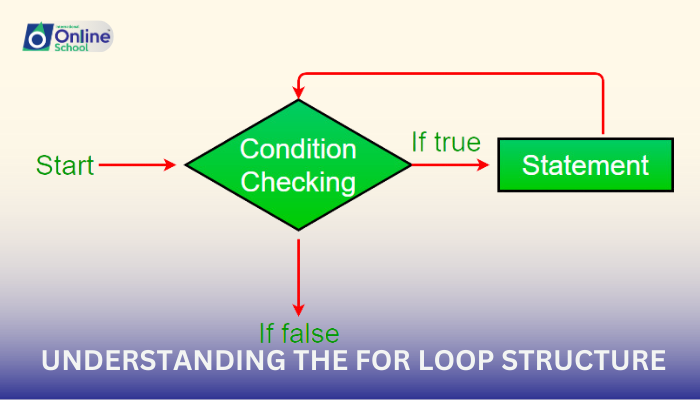
Lesson 02: Understanding the For Loop Structure

Lesson 66/93 | Study Time: 30 Min
Lesson 02: Understanding the For Loop Structure

Learning Outcomes:


i. Identify the key components of a for loop structure.


ii. Understand how initialization, condition, and update work in a for loop.


iii. Construct and utilize for loops to automate repeated tasks.


iv. Analyze and explain practical examples of for loop usage.


Introduction:


Remember those hardworking loop robots from the last lesson? Today, we're meeting the coolest one of them all - the for loop! Unlike other loop friends who keep working until told to stop, the for loop is a counting champion. It takes a specific number of steps, always knowing exactly when to finish its job.


i. Inside the For Loop Machine:


Imagine you're baking cookies (yum!). You need to scoop dough, flatten it, bake it, and repeat - that's perfect for a for loop! Here's what makes it tick:


Initialization Expression: This sets the starting point, like preheating the oven at 350°F. In code, it could be a variable set to 0.


Test Expression: This checks if the job is done, like checking if the cookies are golden brown. In code, it could be "i <= 12" where i is your cookie counter.


Body of the Loop: This is where the magic happens! This is where you scoop, flatten, and bake each cookie (the actual baking instructions in code).


Increment/Decrement Expression: This updates the counter after each loop, like moving on to the next cookie sheet. In code, it could be "i++" which adds 1 to i after each baking round.


ii. Looping in Action:


Let's see how this looks in real code:


Python


for i in range(5):


print("Baking cookie number", i + 1)


# Baking instructions here (like scooping dough)


This loop starts with i = 0, checks if i <= 5, prints the cookie number, performs the baking instructions, and then adds 1 to i. It keeps doing this until all 5 cookies are baked!


Beyond Cookies:


For loops aren't just for baking! They can be used for anything that needs to be done repeatedly a specific number of times, like:


  • Counting down before launching a rocket

  • Printing stars to make a cool banner

  • Adding up all the numbers in a list


The for loop is your go-to champ for controlled repetition in programming. By understanding its parts and practicing with different examples, you can become a looping master and code anything your heart desires! Remember, the for loop is here to help you save time and effort, making coding as sweet as freshly baked cookies!


Saboor Ali

Saboor Ali

Product Designer

Class Sessions

1- Lesson 01: Problem Definition 2- Lesson 02: Problem Analysis 3- Lesson 03: Planning Solutions 4- Lesson 04: Candid Solutions 5- Lesson 05: Evaluating Solutions 6- Lesson 06: Introduction to Algorithms 7- Lesson 07: The Role of Algorithms in Problem Solving 8- Lesson 08: Criteria for Measuring Efficiency 9- Lesson 09: Basic Arithmetic Operations 10- Lesson 10: Decision Making in Algorithms 11- Lesson 11: Physics Applications of Algorithms 12- Lesson 12: Geometric Algorithms 13- Lesson 13: Area Calculation Algorithms 14- Lesson 14: Educational Grading Algorithm 15- Lesson 15: Financial Algorithms 16- Lesson 16: Exponential Calculation 17- Lesson 17: Sequence Generation Algorithms 18- Lesson 18: Counting Multiples Algorithms 19- Lesson 19: Multiplication Table Algorithm 20- Lesson 20: Temperature Conversion Algorithms 21- Lesson 21: Odd and Even Number Algorithms 22- Lesson 22: List Manipulation Algorithms 23- Lesson 23: Greatest Common Divisor (GCD) Algorithm 24- Lesson 24: Prime Number Algorithms 25- Lesson 25: Introduction to Flow Charts 26- Lesson 26: Importance of Flow Charts in Problem Solving 27- Lesson 27: Requirements Determination in Flow Charts 28- Lesson 28: Flow Chart Symbols 29- Lesson 29: Drawing Flow Charts of Algorithms 30- Lesson 01: Understanding Computer Programs 31- Lesson 02: Levels of Programming Languages 32- Lesson 03: Characteristics of High-Level Languages 33- Lesson 04: Popular High-Level Programming Languages 34- Lesson 05: Compiler vs. Interpreter 35- Lesson 06: Introduction to Integrated Development Environments (IDE) 36- Lesson 07: Components of C Programming Environment 37- Lesson 08: Introduction to Programming Basics 38- Lesson 09: Comments and their Purpose 39- Lesson 10: Constants and Variables 40- Lesson 11: Data Types in C 41- Lesson 12: Type Casting and Constant Qualifier 42- Lesson 13: Declaring and Initializing Variables and Constants 43- Lesson 01: Output Functions in C 44- Lesson 02: Input Functions in C 45- Lesson 03: Statement Terminator and Format Specifiers 46- Lesson 04: Escape Sequences in C 47- Lesson 05: Introduction to Operators 48- Lesson 06: Arithmetic Operators in C 49- Lesson 07: Assignment and Increment/Decrement Operators 50- Lesson 08: Relational Operators in C 51- Lesson 09: Introduction to Logical Operators 52- Lesson 10: Practical Use of Logical Operators 53- Lesson 11: Differentiating Assignment and Equal To Operators 54- Lesson 12: Unary and Binary Operators 55- Lesson 13: Ternary (Conditional) Operator 56- Lesson 14: Order of Precedence of Operators 57- Lesson 01: Introduction to Control Structures 58- Lesson 02: Understanding Conditional Statements 59- Lesson 03: Structure and Use of if Statement 60- Lesson 04: Structure and Use of if-else Statement 61- Lesson 05: Understanding the Switch Statement 62- Lesson 06: The Role of Break in Switch Statement 63- Lesson 07: Nested Selection Structures 64- Lesson 08: Differentiating Among Selection Structures 65- Lesson 01: Introduction to Loop Structures 66- Lesson 02: Understanding the For Loop Structure 67- Lesson 03: Understanding the While Loop Structure 68- Lesson 04: Understanding the Do-While Loop Structure 69- Lesson 05: Use of Break and Continue Statements 70- Lesson 06: Differentiating Among Loop Structures 71- Lesson 07: Introduction to Nested Loops 72- Lesson 01: Introduction to Data Representation 73- Lesson 02: Understanding Logic Gates 74- Lesson 03: Truth Tables and Additional Logic Gates 75- Lesson 04: Conversion of Boolean Expressions to Logic Circuits 76- Lesson 05: Introduction to K-Maps 77- Lesson 06: Simplification of Two and Three Variable Boolean Functions 78- Lesson 07: Building Logic Circuits from Simplified Expressions 79- Lesson 01: Introduction to the World Wide Web 80- Lesson 02: Types of Websites 81- Lesson 03: Introduction to HTML 82- Lesson 04: HTML Elements and Tags 83- Lesson 05: Text Formatting Basics 84- Lesson 06: Text Formatting Tags 85- Lesson 07: Detailed Text Formatting 86- Lesson 08: Creating Various Lists 87- Lesson 09: Adding Images and Borders 88- Lesson 10: Applying Background Colors and Images 89- Lesson 11: Introduction to Hyperlinks 90- Lesson 12: Creating Graphical Hyperlinks 91- Lesson 13: Creating Tables 92- Lesson 14: Introduction to Frames 93- Lesson 15: Creating Framesets with Multiple Frames